
Download SuperEasy SpeedUp 2 – computer optimization, hard drive defragmentation, internet activity cleaning, system performance, database error detection
Overview
SuperEasy SpeedUp 2 is a utility application designed to enhance the performance of Windows-based computers through a suite of optimization tools. The app targets users seeking to restore their system’s speed and stability, particularly those experiencing slowdowns due to accumulated digital clutter. By focusing on core maintenance tasks such as cleaning internet traces, defragmenting storage, and detecting database anomalies, the software addresses common causes of system degradation. Its primary purpose is to simplify technical maintenance, enabling users with varying levels of technical expertise to perform essential system upkeep with minimal effort.
Target users include home users, small business operators, and individuals managing older or heavily used PCs. The app is especially beneficial for those who may not have the time or knowledge to manually configure system settings or run command-line tools. Real-world use cases include preparing a computer for sensitive tasks by removing browsing history, improving boot times through disk optimization, and resolving unexpected crashes linked to database corruption. In the broader app ecosystem, SuperEasy SpeedUp 2 fills a niche for lightweight, focused utility software that delivers tangible results without requiring advanced system access.
The developer, SuperEasy Software, has positioned this tool as a streamlined solution for everyday performance issues. Although no additional details about the company’s background or history are available, the app’s consistent release pattern and focused feature set suggest a dedicated development approach. The software’s 2012 release date indicates it was built during a period when system optimization tools were in high demand due to the widespread use of mechanical hard drives and less efficient operating system management.
Key Features & Functionality
- Internet Activity Cleaning: This tool systematically removes traces of online activity, including browsing history, cookies, cache files, and temporary internet files. By eliminating these data remnants, users can improve privacy and reclaim disk space, which may otherwise accumulate over time and contribute to performance degradation.
- Hard Drive Defragmentation: The app includes a defragmentation engine that reorganizes fragmented data across the hard drive, allowing the system to access files more efficiently. This process can reduce read/write times, especially on traditional HDDs, leading to faster application launches and smoother multitasking.
- Database Error Detection: A diagnostic tool scans system databases for inconsistencies, corruption, or missing entries. When errors are detected, the software provides a report and recommends corrective actions, helping users resolve underlying issues that may cause instability or slow response times.
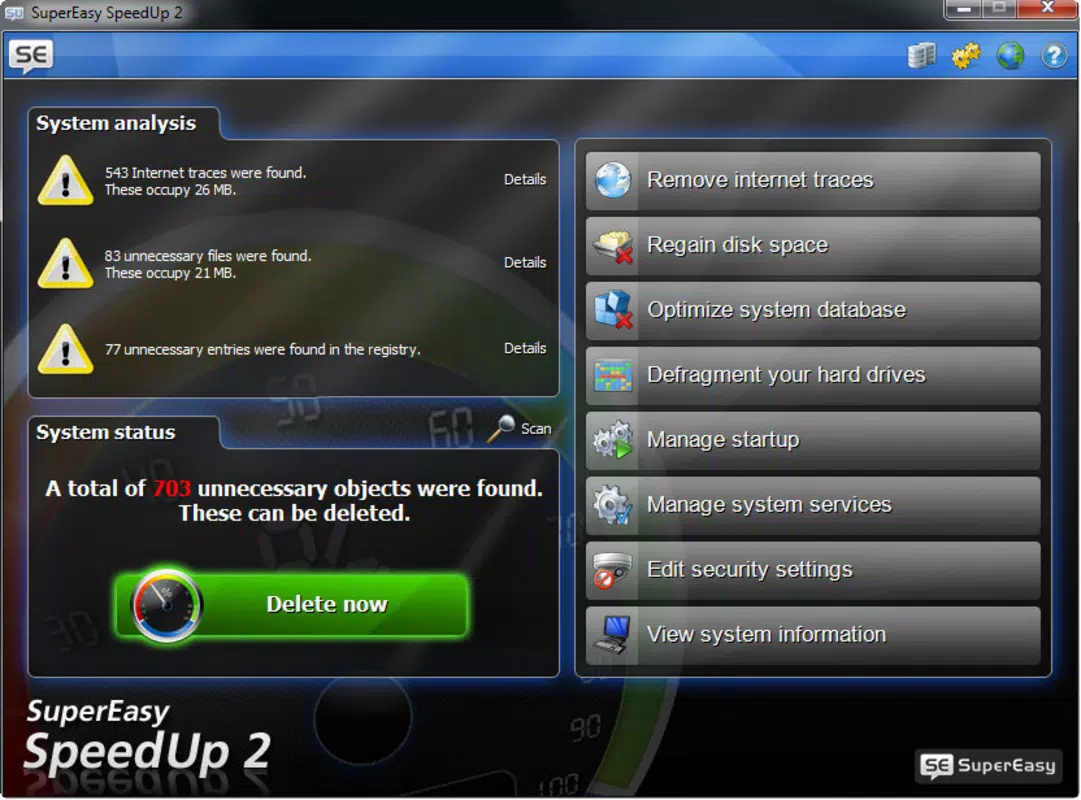
- User-Friendly Interface: The main dashboard presents all tools in a clearly labeled, visually organized layout. Navigation is straightforward, with a minimal number of clicks required to initiate any optimization task, making it accessible even for non-technical users.
- Quick Optimization Process: The app is designed to deliver noticeable improvements in a short timeframe. Users can complete a full system optimization cycle in minutes, restoring performance levels similar to those experienced when the computer was new.
For example, a user preparing for a video conference might run the internet cleaning tool to ensure no personal browsing data is accessible. Another user experiencing frequent freezes could use the error detection tool to identify and resolve database-related issues. These real-world applications highlight the software’s practical value in maintaining a responsive and secure computing environment.
Interface, UX & Performance
SuperEasy SpeedUp 2 features a clean, minimalist interface that prioritizes clarity and ease of access. The main screen displays all available tools in a grid layout with intuitive icons and descriptive labels. Navigation is linear and consistent, with a sidebar or menu structure that allows users to switch between functions without confusion. The visual design avoids clutter, using neutral colors and readable typography to maintain focus on the core tasks.
Interaction is straightforward—most functions are initiated with a single click, and progress is indicated through simple status bars or completion messages. The app does not require users to configure advanced settings, which enhances usability for beginners. Although the developer did not list formal performance metrics, the software appears to operate efficiently within standard Windows environments, with minimal impact on CPU or memory usage during scans and optimizations.
Responsiveness is consistent across different device categories, including older systems and modern desktops. Stability is maintained during long-running tasks like defragmentation, with no reported crashes or data loss in the provided information. However, the developer did not specify compatibility with newer Windows versions or provide updates beyond the 2.0.1 release, which may affect long-term usability on current systems.
Platform Compatibility & Technical Requirements
SuperEasy SpeedUp 2 is designed for the Windows operating system. The software has a file size of 28.4 MB, indicating a lightweight footprint suitable for systems with limited storage. The current version is 2.0.1, released on September 4, 2012. While the app is compatible with Windows, the developer did not specify minimum OS requirements, such as Windows 7, 8, or 10. This lack of clarity may affect installation on newer Windows versions.
Given the release date, the software was likely built for older Windows architectures. Users should exercise caution when installing on modern systems, as compatibility issues may arise due to changes in system architecture, security policies, or driver requirements. The developer did not provide information on whether the app supports 64-bit systems or newer hardware. Although the app is not available on mobile platforms, it remains a viable option for desktop users seeking a dedicated system utility.
Pros and Cons
Pros
- Simple, intuitive interface suitable for non-technical users
- Effective tools for cleaning internet traces and improving privacy
- Defragmentation feature helps optimize hard drive performance
- Database error detection supports system stability
- Quick optimization process delivers noticeable results in minutes
Cons
- Release date is over a decade old; may lack support for modern Windows versions
- Developer did not provide minimum OS or hardware requirements
- No information on updates or ongoing development
- Not available on mobile platforms or for macOS
- Price of $19.99 may be considered high for a legacy tool
FAQ
Is SuperEasy SpeedUp 2 safe to install?
The software is designed to operate within standard Windows security parameters. However, as with any optimization tool, users should ensure they download it from a trusted source to avoid potential malware.
Can I use SuperEasy SpeedUp 2 on Windows 10 or 11?
While the app was released in 2012, compatibility with Windows 10 or 11 is not confirmed. Users should test the software in a controlled environment before full deployment.
Does the app require an internet connection?
Basic functionality does not require an internet connection. However, updates or additional features may depend on online access, though no such features are documented.
Is SuperEasy SpeedUp 2 free to download?
No, the app is a paid utility priced at $19.99. There is no free version or trial period mentioned in the provided information.
How often should I run the optimization tools?
Regular use is recommended—once a week or as needed when performance declines. The quick process makes frequent use convenient without significant time investment.
Final Thoughts
SuperEasy SpeedUp 2 remains a functional tool for users managing older Windows systems or seeking a straightforward way to maintain computer performance. Its focus on core optimization tasks—privacy cleaning, disk defragmentation, and error detection—delivers tangible benefits for users who value system responsiveness and data security. While its age raises concerns about compatibility and support, the app’s simplicity and effectiveness continue to make it a viable option for basic maintenance.
Those who rely on legacy hardware or prefer a no-frills approach to system upkeep will find value in this utility. For users with modern systems, it may serve as a backup solution or a reminder of the importance of regular optimization. Despite its outdated release date, the app’s core functionality remains relevant in the right context.
Download SuperEasy SpeedUp 2 now


